
Steven Bealle
Cybersecurity Analyst
Cybersecurity Analyst
This project demonstrates the automated hardening of a Windows 11 Virtual Machine to meet the rigorous security standards of the Defense Information Systems Agency (DISA) Security Technical Implementation Guides (STIGs).
Using Tenable Nessus for vulnerability scanning and PowerShell for remediation, I identified critical configuration vulnerabilities and developed scripts to automatically correct them, significantly reducing the system's attack surface.
DISA STIGs are the "gold standard" for secure configuration. They are a set of technical cybersecurity requirements for specific software and hardware, developed by the Department of Defense (DoD). Compliance with STIGs is mandatory for any system connecting to DoD networks.
Why this matters:
Below is the repository of PowerShell scripts developed to resolve specific findings from the initial vulnerability scan.
STIG ID: WN11-AU-000510
# Ensure the script is run as Administrator
$currentPrincipal = New-Object Security.Principal.WindowsPrincipal([Security.Principal.WindowsIdentity]::GetCurrent())
if (-not $currentPrincipal.IsInRole([Security.Principal.WindowsBuiltInRole]::Administrator)) {
    Write-Warning "This script requires Administrator privileges. Please run as Administrator."
    Exit
}

# Define Registry Path and Value
$regPath = "HKLM:\SOFTWARE\Policies\Microsoft\Windows\EventLog\System"
$valueName = "MaxSize"
$valueData = 32768  # 32768 KB (0x8000)

try {
    # Check if the registry path exists; create it if missing
    if (-not (Test-Path $regPath)) {
        Write-Host "Registry path not found. Creating path: $regPath" -ForegroundColor Cyan
        New-Item -Path $regPath -Force | Out-Null
    }

    # Set the MaxSize value
    Write-Host "Setting '$valueName' to '$valueData' in $regPath..." -ForegroundColor Cyan
    New-ItemProperty -Path $regPath -Name $valueName -Value $valueData -PropertyType DWORD -Force | Out-Null

    # Verification Step
    $currentValue = Get-ItemProperty -Path $regPath -Name $valueName -ErrorAction SilentlyContinue
    if ($currentValue.MaxSize -eq $valueData) {
        Write-Host "SUCCESS: System event log size configured to $($currentValue.MaxSize) KB." -ForegroundColor Green
    } else {
        Write-Error "FAILURE: Value could not be verified."
    }

} catch {
    Write-Error "An error occurred: $_"
}STIG ID: WN11-AU-000505
# Ensure the script is run as Administrator
$currentPrincipal = New-Object Security.Principal.WindowsPrincipal([Security.Principal.WindowsIdentity]::GetCurrent())
if (-not $currentPrincipal.IsInRole([Security.Principal.WindowsBuiltInRole]::Administrator)) {
    Write-Warning "This script requires Administrator privileges. Please run as Administrator."
    Exit
}

# Define Registry Path and Value
$regPath = "HKLM:\SOFTWARE\Policies\Microsoft\Windows\EventLog\Security"
$valueName = "MaxSize"
$valueData = 1024000  # 1,024,000 KB (0xFA000)

try {
    # Check if the registry path exists; create it if missing
    if (-not (Test-Path $regPath)) {
        Write-Host "Registry path not found. Creating path: $regPath" -ForegroundColor Cyan
        New-Item -Path $regPath -Force | Out-Null
    }

    # Set the MaxSize value
    Write-Host "Setting '$valueName' to '$valueData' in $regPath..." -ForegroundColor Cyan
    New-ItemProperty -Path $regPath -Name $valueName -Value $valueData -PropertyType DWORD -Force | Out-Null

    # Verification Step
    $currentValue = Get-ItemProperty -Path $regPath -Name $valueName -ErrorAction SilentlyContinue
    if ($currentValue.MaxSize -eq $valueData) {
        Write-Host "SUCCESS: Security event log size configured to $($currentValue.MaxSize) KB." -ForegroundColor Green
    } else {
        Write-Error "FAILURE: Value could not be verified."
    }

} catch {
    Write-Error "An error occurred: $_"
}STIG ID: WN11-AU-000500
# Ensure the script is run as Administrator
$currentPrincipal = New-Object Security.Principal.WindowsPrincipal([Security.Principal.WindowsIdentity]::GetCurrent())
if (-not $currentPrincipal.IsInRole([Security.Principal.WindowsBuiltInRole]::Administrator)) {
    Write-Warning "This script requires Administrator privileges. Please run as Administrator."
    Exit
}

# Define Registry Path and Value
$regPath = "HKLM:\SOFTWARE\Policies\Microsoft\Windows\EventLog\Application"
$valueName = "MaxSize"
$valueData = 32768  # 32,768 KB (0x8000)

try {
    # Check if the registry path exists; create it if missing
    if (-not (Test-Path $regPath)) {
        Write-Host "Registry path not found. Creating path: $regPath" -ForegroundColor Cyan
        New-Item -Path $regPath -Force | Out-Null
    }

    # Set the MaxSize value
    Write-Host "Setting '$valueName' to '$valueData' in $regPath..." -ForegroundColor Cyan
    New-ItemProperty -Path $regPath -Name $valueName -Value $valueData -PropertyType DWORD -Force | Out-Null

    # Verification Step
    $currentValue = Get-ItemProperty -Path $regPath -Name $valueName -ErrorAction SilentlyContinue
    if ($currentValue.MaxSize -eq $valueData) {
        Write-Host "SUCCESS: Application event log size configured to $($currentValue.MaxSize) KB." -ForegroundColor Green
    } else {
        Write-Error "FAILURE: Value could not be verified."
    }

} catch {
    Write-Error "An error occurred: $_"
}STIG ID: WN11-CC-000315
# Ensure the script is run as Administrator
$currentPrincipal = New-Object Security.Principal.WindowsPrincipal([Security.Principal.WindowsIdentity]::GetCurrent())
if (-not $currentPrincipal.IsInRole([Security.Principal.WindowsBuiltInRole]::Administrator)) {
    Write-Warning "This script requires Administrator privileges. Please run as Administrator."
    Exit
}

# Define Registry Path and Value
$regPath = "HKLM:\SOFTWARE\Policies\Microsoft\Windows\Installer"
$valueName = "AlwaysInstallElevated"
$valueData = 0  # 0 = Disabled (Secure)

try {
    # Check if the registry path exists; create it if missing
    if (-not (Test-Path $regPath)) {
        Write-Host "Registry path not found. Creating path: $regPath" -ForegroundColor Cyan
        New-Item -Path $regPath -Force | Out-Null
    }

    # Set the AlwaysInstallElevated value to 0
    Write-Host "Setting '$valueName' to '$valueData' in $regPath..." -ForegroundColor Cyan
    New-ItemProperty -Path $regPath -Name $valueName -Value $valueData -PropertyType DWORD -Force | Out-Null

    # Verification Step
    $currentValue = Get-ItemProperty -Path $regPath -Name $valueName -ErrorAction SilentlyContinue
    if ($currentValue.AlwaysInstallElevated -eq $valueData) {
        Write-Host "SUCCESS: 'Always install with elevated privileges' has been DISABLED (0)." -ForegroundColor Green
    } else {
        Write-Error "FAILURE: Value could not be verified."
    }

} catch {
    Write-Error "An error occurred: $_"
}STIG ID: WN11-CC-000310
# Ensure the script is run as Administrator
$currentPrincipal = New-Object Security.Principal.WindowsPrincipal([Security.Principal.WindowsIdentity]::GetCurrent())
if (-not $currentPrincipal.IsInRole([Security.Principal.WindowsBuiltInRole]::Administrator)) {
    Write-Warning "This script requires Administrator privileges. Please run as Administrator."
    Exit
}

# Define Registry Path and Value
$regPath = "HKLM:\SOFTWARE\Policies\Microsoft\Windows\Installer"
$valueName = "EnableUserControl"
$valueData = 0  # 0 = Disabled (Secure)

try {
    # Check if the registry path exists; create it if missing
    if (-not (Test-Path $regPath)) {
        Write-Host "Registry path not found. Creating path: $regPath" -ForegroundColor Cyan
        New-Item -Path $regPath -Force | Out-Null
    }

    # Set the EnableUserControl value to 0
    Write-Host "Setting '$valueName' to '$valueData' in $regPath..." -ForegroundColor Cyan
    New-ItemProperty -Path $regPath -Name $valueName -Value $valueData -PropertyType DWORD -Force | Out-Null

    # Verification Step
    $currentValue = Get-ItemProperty -Path $regPath -Name $valueName -ErrorAction SilentlyContinue
    if ($currentValue.EnableUserControl -eq $valueData) {
        Write-Host "SUCCESS: 'Allow user control over installs' has been DISABLED (0)." -ForegroundColor Green
    } else {
        Write-Error "FAILURE: Value could not be verified."
    }

} catch {
    Write-Error "An error occurred: $_"
}STIG ID: WN11-CC-000330
# Ensure the script is run as Administrator
$currentPrincipal = New-Object Security.Principal.WindowsPrincipal([Security.Principal.WindowsIdentity]::GetCurrent())
if (-not $currentPrincipal.IsInRole([Security.Principal.WindowsBuiltInRole]::Administrator)) {
    Write-Warning "This script requires Administrator privileges. Please run as Administrator."
    Exit
}

# Define Registry Path and Value
$regPath = "HKLM:\SOFTWARE\Policies\Microsoft\Windows\WinRM\Client"
$valueName = "AllowBasic"
$valueData = 0  # 0 = Disabled (Secure)

try {
    # Check if the registry path exists; create it if missing
    if (-not (Test-Path $regPath)) {
        Write-Host "Registry path not found. Creating path: $regPath" -ForegroundColor Cyan
        New-Item -Path $regPath -Force | Out-Null
    }

    # Set the AllowBasic value to 0
    Write-Host "Setting '$valueName' to '$valueData' in $regPath..." -ForegroundColor Cyan
    New-ItemProperty -Path $regPath -Name $valueName -Value $valueData -PropertyType DWORD -Force | Out-Null

    # Verification Step
    $currentValue = Get-ItemProperty -Path $regPath -Name $valueName -ErrorAction SilentlyContinue
    if ($currentValue.AllowBasic -eq $valueData) {
        Write-Host "SUCCESS: WinRM Client Basic Authentication has been DISABLED (0)." -ForegroundColor Green
    } else {
        Write-Error "FAILURE: Value could not be verified."
    }

} catch {
    Write-Error "An error occurred: $_"
}STIG ID: WN11-CC-000345
# Ensure the script is run as Administrator
$currentPrincipal = New-Object Security.Principal.WindowsPrincipal([Security.Principal.WindowsIdentity]::GetCurrent())
if (-not $currentPrincipal.IsInRole([Security.Principal.WindowsBuiltInRole]::Administrator)) {
    Write-Warning "This script requires Administrator privileges. Please run as Administrator."
    Exit
}

# Define Registry Path and Value
$regPath = "HKLM:\SOFTWARE\Policies\Microsoft\Windows\WinRM\Service"
$valueName = "AllowBasic"
$valueData = 0  # 0 = Disabled (Secure)

try {
    # Check if the registry path exists; create it if missing
    if (-not (Test-Path $regPath)) {
        Write-Host "Registry path not found. Creating path: $regPath" -ForegroundColor Cyan
        New-Item -Path $regPath -Force | Out-Null
    }

    # Set the AllowBasic value to 0
    Write-Host "Setting '$valueName' to '$valueData' in $regPath..." -ForegroundColor Cyan
    New-ItemProperty -Path $regPath -Name $valueName -Value $valueData -PropertyType DWORD -Force | Out-Null

    # Verification Step
    $currentValue = Get-ItemProperty -Path $regPath -Name $valueName -ErrorAction SilentlyContinue
    if ($currentValue.AllowBasic -eq $valueData) {
        Write-Host "SUCCESS: WinRM Service Basic Authentication has been DISABLED (0)." -ForegroundColor Green
    } else {
        Write-Error "FAILURE: Value could not be verified."
    }

} catch {
    Write-Error "An error occurred: $_"
}STIG ID: WN11-CC-000326
# Ensure the script is run as Administrator
$currentPrincipal = New-Object Security.Principal.WindowsPrincipal([Security.Principal.WindowsIdentity]::GetCurrent())
if (-not $currentPrincipal.IsInRole([Security.Principal.WindowsBuiltInRole]::Administrator)) {
    Write-Warning "This script requires Administrator privileges. Please run as Administrator."
    Exit
}

# Define Registry Path and Value
$regPath = "HKLM:\SOFTWARE\Policies\Microsoft\Windows\PowerShell\ScriptBlockLogging"
$valueName = "EnableScriptBlockLogging"
$valueData = 1  # 1 = Enabled

try {
    # Check if the registry path exists; create it if missing
    if (-not (Test-Path $regPath)) {
        Write-Host "Registry path not found. Creating path: $regPath" -ForegroundColor Cyan
        New-Item -Path $regPath -Force | Out-Null
    }

    # Set the EnableScriptBlockLogging value to 1
    Write-Host "Setting '$valueName' to '$valueData' in $regPath..." -ForegroundColor Cyan
    New-ItemProperty -Path $regPath -Name $valueName -Value $valueData -PropertyType DWORD -Force | Out-Null

    # Verification Step
    $currentValue = Get-ItemProperty -Path $regPath -Name $valueName -ErrorAction SilentlyContinue
    if ($currentValue.EnableScriptBlockLogging -eq $valueData) {
        Write-Host "SUCCESS: PowerShell Script Block Logging has been ENABLED (1)." -ForegroundColor Green
    } else {
        Write-Error "FAILURE: Value could not be verified."
    }

} catch {
    Write-Error "An error occurred: $_"
}STIG ID: WN11-CC-000327
# Ensure the script is run as Administrator
$currentPrincipal = New-Object Security.Principal.WindowsPrincipal([Security.Principal.WindowsIdentity]::GetCurrent())
if (-not $currentPrincipal.IsInRole([Security.Principal.WindowsBuiltInRole]::Administrator)) {
    Write-Warning "This script requires Administrator privileges. Please run as Administrator."
    Exit
}

# Define Registry Path and Value
$regPath = "HKLM:\SOFTWARE\Policies\Microsoft\Windows\PowerShell\Transcription"
$valueName = "EnableTranscripting"
$valueData = 1  # 1 = Enabled

# Optional: Define Output Directory (Uncomment and edit the line below to set a secure path)
# $outputDirectory = "C:\Windows\Logs\PowerShellTranscript"

try {
    # Check if the registry path exists; create it if missing
    if (-not (Test-Path $regPath)) {
        Write-Host "Registry path not found. Creating path: $regPath" -ForegroundColor Cyan
        New-Item -Path $regPath -Force | Out-Null
    }

    # Set the EnableTranscripting value to 1
    Write-Host "Setting '$valueName' to '$valueData' in $regPath..." -ForegroundColor Cyan
    New-ItemProperty -Path $regPath -Name $valueName -Value $valueData -PropertyType DWORD -Force | Out-Null

    # Optional: Set the OutputDirectory if defined
    if ($Variable:outputDirectory) {
        Write-Host "Setting OutputDirectory to '$outputDirectory'..." -ForegroundColor Cyan
        New-ItemProperty -Path $regPath -Name "OutputDirectory" -Value $outputDirectory -PropertyType String -Force | Out-Null
    }

    # Verification Step
    $currentValue = Get-ItemProperty -Path $regPath -Name $valueName -ErrorAction SilentlyContinue
    if ($currentValue.EnableTranscripting -eq $valueData) {
        Write-Host "SUCCESS: PowerShell Transcription has been ENABLED (1)." -ForegroundColor Green
        if ($Variable:outputDirectory) {
             Write-Host "       Output Directory set to: $outputDirectory" -ForegroundColor Green
        }
    } else {
        Write-Error "FAILURE: Value could not be verified."
    }

} catch {
    Write-Error "An error occurred: $_"
}STIG ID: WN11-CC-000155
# Ensure the script is run as Administrator
$currentPrincipal = New-Object Security.Principal.WindowsPrincipal([Security.Principal.WindowsIdentity]::GetCurrent())
if (-not $currentPrincipal.IsInRole([Security.Principal.WindowsBuiltInRole]::Administrator)) {
    Write-Warning "This script requires Administrator privileges. Please run as Administrator."
    Exit
}

# Define Registry Path and Value
$regPath = "HKLM:\SOFTWARE\Policies\Microsoft\Windows NT\Terminal Services"
$valueName = "fAllowToGetHelp"
$valueData = 0  # 0 = Disabled (Secure)

try {
    # Check if the registry path exists; create it if missing
    if (-not (Test-Path $regPath)) {
        Write-Host "Registry path not found. Creating path: $regPath" -ForegroundColor Cyan
        New-Item -Path $regPath -Force | Out-Null
    }

    # Set the fAllowToGetHelp value to 0
    Write-Host "Setting '$valueName' to '$valueData' in $regPath..." -ForegroundColor Cyan
    New-ItemProperty -Path $regPath -Name $valueName -Value $valueData -PropertyType DWORD -Force | Out-Null

    # Verification Step
    $currentValue = Get-ItemProperty -Path $regPath -Name $valueName -ErrorAction SilentlyContinue
    if ($currentValue.fAllowToGetHelp -eq $valueData) {
        Write-Host "SUCCESS: Solicited Remote Assistance has been DISABLED (0)." -ForegroundColor Green
    } else {
        Write-Error "FAILURE: Value could not be verified."
    }

} catch {
    Write-Error "An error occurred: $_"
}STIG ID: WN11-CC-000039
# Ensure the script is run as Administrator
$currentPrincipal = New-Object Security.Principal.WindowsPrincipal([Security.Principal.WindowsIdentity]::GetCurrent())
if (-not $currentPrincipal.IsInRole([Security.Principal.WindowsBuiltInRole]::Administrator)) {
    Write-Warning "This script requires Administrator privileges. Please run as Administrator."
    Exit
}

# Define the four registry paths required by the STIG
$regPaths = @(
    "HKLM:\SOFTWARE\Classes\batfile\shell\runasuser",
    "HKLM:\SOFTWARE\Classes\cmdfile\shell\runasuser",
    "HKLM:\SOFTWARE\Classes\exefile\shell\runasuser",
    "HKLM:\SOFTWARE\Classes\mscfile\shell\runasuser"
)

$valueName = "SuppressionPolicy"
$valueData = 4096  # 0x1000

try {
    foreach ($path in $regPaths) {
        # Check if the registry path exists; create it if missing
        if (-not (Test-Path $path)) {
            Write-Host "Registry path not found. Creating path: $path" -ForegroundColor Cyan
            New-Item -Path $path -Force | Out-Null
        }

        # Set the SuppressionPolicy value
        Write-Host "Setting '$valueName' to '$valueData' in $path..." -ForegroundColor Cyan
        New-ItemProperty -Path $path -Name $valueName -Value $valueData -PropertyType DWORD -Force | Out-Null

        # Verification Step
        $currentValue = Get-ItemProperty -Path $path -Name $valueName -ErrorAction SilentlyContinue
        if ($currentValue.SuppressionPolicy -eq $valueData) {
            Write-Host "SUCCESS: Configured correctly for $($path.Split('\')[-3])." -ForegroundColor Green
        } else {
            Write-Error "FAILURE: Value could not be verified for $path."
        }
    }
} catch {
    Write-Error "An error occurred: $_"
}To verify the effectiveness of the remediation scripts, a Tenable Nessus vulnerability scan was conducted before and after the script execution.
The initial scan revealed multiple high and medium severity vulnerabilities corresponding to the STIG checks listed above. Below is one example of a vulnerability which was remediated and passed on the final scan.
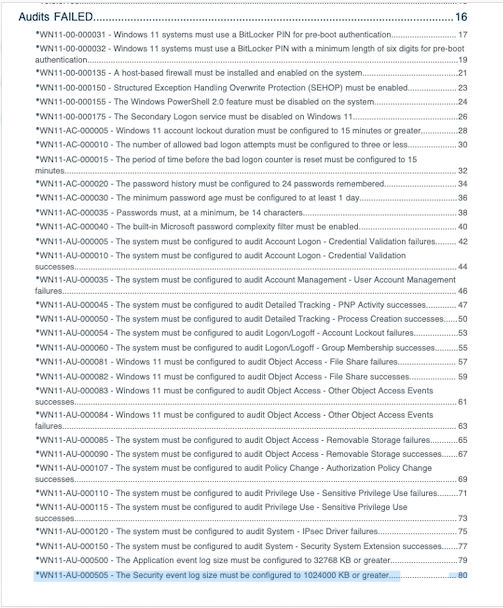
Figure 1: Initial vulnerability scan results showing failed compliance checks.
After executing the PowerShell automation suite, a follow-up scan confirmed that all targeted vulnerabilities were successfully remediated. The system is now compliant with the specified DISA STIG controls.
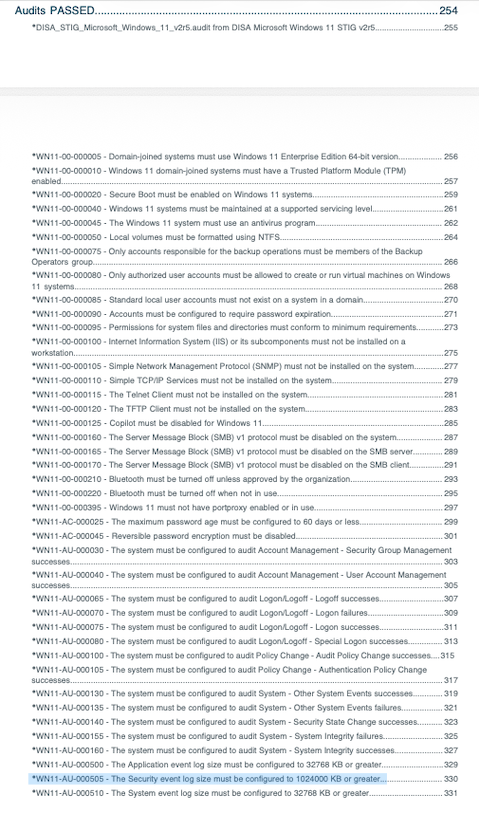
Figure 2: Final vulnerability scan results showing successful remediation (Green/Passed).
This project highlights the critical role of automated policy enforcement in cybersecurity. By scripting the remediation of DISA STIG findings, I reduced the time required to secure the endpoint from hours of manual registry editing to seconds of script execution, ensuring a repeatable and auditable security baseline.